


DMV Permit Practice Test 2026
4.740.00 Reviews
App Specs
- Version
- 2.0.1
- Updated On
- License
- Free
- Downloads
- 50,000+
- Developer
- Tele Labs
- Categories
- Auto & Vehicles
- Platform
- Android
Screenshots
 Analysis by AppCompare
If you’re like me, the thought of heading to the DMV for a permit test is about as appealing as a root canal. Enter the DMV Permit Practice Test 2026 app, a handy tool that makes preparing for your permit test a whole lot easier and, dare I say, enjoyable. I took it for a spin recently, and here’s my take on how it stacks up.
A convenient way to begin studying
For a learner who is just starting, the main attraction is having practice material ready for short study sessions rather than needing to set aside a long stretch of time. I’d use it when I have a few spare minutes, then return to the questions I missed when I can concentrate. That approach makes test preparation feel less like one intimidating task and more like a routine I can keep up.
It is especially useful if you are studying around school, work, or family commitments. A realistic session might be reviewing a few questions while waiting for a ride, then spending longer at home going back over the topics that still feel uncertain. I would avoid trying to learn everything in hurried fragments, though: brief sessions are good for repetition, but careful reading matters when a question turns on a small distinction in a traffic rule.
What to expect from the study material
The app focuses on permit-test preparation, covering areas such as road signs and traffic laws. That gives it a clear role: it is a study aid, not a replacement for the driver handbook or the rules that apply where you live. Permit requirements and wording can vary by state or region, so I’d check the official material for your licensing area and use the app to practice recalling what you have learned.
This distinction matters most when you see a question that seems familiar but uses wording you have not encountered in your local handbook. Rather than memorizing an answer by position or pattern, I’d pause and ask what rule the question is testing. Then I’d verify that rule against the official handbook. That extra step helps turn practice into understanding and reduces the risk of carrying a general answer into a local exam where the details differ.
Getting Started
First things first, let’s talk about getting started with the DMV Permit Practice Test 2026. The app is available for both Android and iOS, so it’s pretty accessible no matter your device preference. Downloading it was a breeze, and it didn’t take up much space on my phone, which is a win in my book.
Once you launch the app, you’re greeted by a clean and intuitive interface. It’s straightforward, which means you’re not spending precious minutes trying to figure out where everything is. Trust me, I’ve seen some clunky interfaces in my day, and this isn’t one of them.
Worth Reading Before You Choose

EA SPORTS FC Mobile 26 Is a Bigger Football Game, but It Takes Time

Flipboard Shows What News Apps Must Do Beyond the Feed

Switching to Android Auto Means Rethinking Your Driving Routine

Google Calendar Makes a Crowded Week Easier to Manage

Ludo King Makes the Most of the Minutes Between Plans

Baby Panda World Brings Quick Play to Modern Phones, but Its Game Library Feels Busy
How it fits into a practical study routine
Tele Labs makes this free Auto & Vehicles app for people preparing for a learner’s permit exam. It has a 4.7 average from around 1.2K ratings, and it has been installed over 50K times. The age rating is Everyone, so it can suit a range of learners, though younger users should still study with a parent or guardian when that makes sense.
I’d treat a practice session as a way to find weak spots, not as proof that I’m ready just because I recognize the questions. One useful workflow is to note the topic behind each mistake, review that rule in the handbook, and then return to similar practice material later. This is more deliberate than repeatedly tapping through questions, and it gives each wrong answer a purpose.
Content and Features
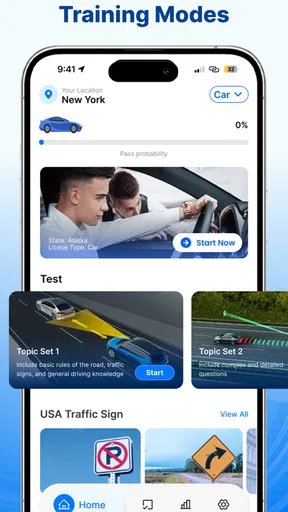
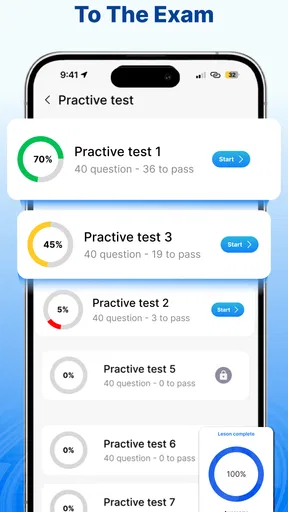
Now, onto the meat of the app: the content. This app is loaded with practice tests that are designed to mimic the real deal. You’ll find a variety of questions that cover all the topics you need to know for the permit test. From road signs to traffic laws, it’s all there.
One feature I particularly liked is the ability to track your progress. You can see which areas you’re acing and which ones might need a little more attention. It’s like having a personal tutor in your pocket. Plus, the app updates regularly, so you’re always working with the most current information.
Progress tracking is most useful when I read it as a map of what to study next, not as a score to chase. If one topic repeatedly causes trouble, I’d give it a focused review instead of taking another broad test immediately. And if a strong result comes from questions I have already seen, I would still mix in handbook reading so that recognition does not get mistaken for mastery.
Using it during busy days
For an everyday example, imagine you have a permit appointment coming up and only a few small gaps in your schedule. You could use one gap to work through practice questions, another to revisit mistakes, and a quieter session later to check the relevant rules in your handbook. That is a better use of scattered time than cramming the night before, because it gives you a chance to notice which concepts are actually sticking.
I would not use the app while driving or in any situation where attention belongs elsewhere. Studying should happen when you are safely parked or not responsible for a vehicle. The same goes for trying to read explanations while walking through a busy area: the convenience of having a phone nearby is useful only when it does not distract from what is happening around you.
User Experience
The user experience of the app is pretty top-notch. The questions are well-organized, and you can easily navigate between different sections. There’s also a handy review feature where you can go back and see where you went wrong. It’s perfect for those of us who learn best from our mistakes.
One thing I noticed is that the app offers explanations for each question, so if you get something wrong, you’re not left in the dark. This is a fantastic way to learn and really cements the knowledge in your brain.
The explanations are a reason to slow down rather than rush through a session. When an answer surprises me, I’d read the explanation, state the rule in my own words, and then check the official handbook if it concerns a local requirement. That simple routine can expose whether I misunderstood the question, forgot a rule, or learned a general principle that needs a local clarification.
Speed, stability, and device fit
In my experience, the app feels geared toward quick access to study rather than demanding a powerful phone. The interface is easy to navigate, and the original download felt light on storage. I would still keep enough free space for ordinary app updates, but I would not choose a device solely for this kind of practice tool.
For a phone that is older or has limited storage, it is sensible to check compatibility before installing: the current version is 2.0.1 and requires Android 7.0 or later. On iOS, I’d check the app’s current compatibility details in the relevant store before downloading. Those checks matter more than assuming that every phone can run every release.
It is a study app, so a slow connection or a brief interruption is less concerning than it would be in a live game or navigation tool. Still, I would not assume that every part of the experience works offline. If you plan to study somewhere with unreliable service, open the app beforehand and make sure you can reach the material you intend to use. For an important final review, having the handbook available as a backup is a sensible precaution.
How it compares with other ways to prepare
Compared with studying only from a handbook, this app offers a more active way to check what you can recall and identify topics that need attention. Compared with a general web search, a focused practice app is less distracting and gives you a structured place to work. But neither convenience nor a practice score makes the official handbook unnecessary; it remains the better reference for local rules and exact requirements.
It may also be less suitable for someone who learns best by annotating printed pages or discussing tricky scenarios with an instructor. In that case, I’d use the app as a quick self-check alongside those methods, not as the entire study plan. And if you need instruction on actually controlling a vehicle, a question-based study tool cannot replace supervised practice or qualified teaching.
User Experience
The user experience of the app is pretty top-notch. The questions are well-organized, and you can easily navigate between different sections. There’s also a handy review feature where you can go back and see where you went wrong. It’s perfect for those of us who learn best from our mistakes.
One thing I noticed is that the app offers explanations for each question, so if you get something wrong, you’re not left in the dark. This is a fantastic way to learn and really cements the knowledge in your brain.
Keeping expectations realistic
The app is free to download, with optional in-app purchases ranging from $5.99 to $38.99 per item. I’d start with what is available without paying and decide whether extra content is genuinely useful for your study habits before buying anything. A paid option is not automatically necessary for every learner, and the right choice depends on whether the material you need is already covered in your routine.
It is also worth remembering that app updates do not remove the need to check current local rules. The app’s version is 2.0.1, but the version number alone should not be treated as a guarantee that every detail matches every jurisdiction’s latest handbook. Before test day, I’d make the local official material the final reference for any rule I am unsure about.
Why It’s Worth a Download
So, why should you give this app a shot? Well, if you’re serious about passing your permit test on the first try, it’s a no-brainer. The app offers a comprehensive, user-friendly way to study that fits perfectly into our busy lives. You can practice a few questions while waiting in line or during your morning commute.
Moreover, the app is designed to reduce the stress that often accompanies test prep. With its engaging format and supportive features, it turns what could be a daunting task into something manageable and even fun.
I’d recommend it most to a learner who wants a convenient way to practice, benefits from seeing mistakes explained, and is willing to pair quick quizzes with official reading. Someone who already has a reliable course and needs detailed, location-specific instruction may get more value from sticking to that plan. The best fit is the person who wants practice woven into the day without confusing practice questions for the whole syllabus.
Final Thoughts
Wrapping it up, the DMV Permit Practice Test 2026 app is a solid tool for anyone gearing up to take their permit test. It’s thorough, easy to use, and provides a level of convenience that traditional study methods just can’t match. So, if you’re ready to hit the road (safely and legally), give this one a try. Happy studying, and here’s to acing that test!
Pros
- Comprehensive question database.
- User-friendly interface.
- Detailed explanations for answers.
- Quick feedback on practice tests.
- Offline access available.
Cons
- Limited customization options.
- Ads can be distracting.
- Some questions are outdated.
- Requires in-app purchases for full access.
- Occasional app crashes.
FAQs for DMV Permit Practice Test 2026
What features does the DMV Permit Practice Test 2026 app offer?
The DMV Permit Practice Test 2026 app provides a comprehensive set of features designed to help users prepare for their driving permit exams. It includes a wide range of practice questions, detailed explanations, progress tracking, and simulated practice tests that mimic the real exam format. The app is updated regularly to reflect the latest DMV guidelines and questions.
Is the DMV Permit Practice Test 2026 app suitable for all states?
Yes, the DMV Permit Practice Test 2026 app is designed to cater to users across all U.S. states. It includes state-specific questions and follows the regulations and guidelines applicable in each state. This ensures that users are practicing with relevant questions that they might encounter on their actual permit test.
Can I track my progress with the DMV Permit Practice Test 2026 app?
The app includes a robust progress tracking feature that allows users to monitor their improvement over time. It provides detailed analytics on performance, highlighting areas of strength and those needing more focus. This feature helps users to effectively tailor their study plan for better results.
Is the DMV Permit Practice Test 2026 app available for both Android and iOS?
Yes, the DMV Permit Practice Test 2026 app is available on both Android and iOS platforms. Users can download it from the Google Play Store and Apple App Store. It is optimized to provide a seamless user experience on both types of devices, ensuring accessibility and convenience.
Are there any costs associated with using the DMV Permit Practice Test 2026 app?
The app offers a free version with limited features, allowing users to try out basic practice questions. For full access to all features, including the extensive question bank and detailed analytics, users can opt for a premium subscription. The pricing is competitive, reflecting the comprehensive resources provided.


